
There's a free dashboard from Google that shows you how Gmail actually sees your email. Whether Gmail trusts you. Whether your messages are landing or getting flagged. How many people are hitting "report spam." And now, whether people even want your email in the first place.
Almost no Shopify brand owner I talk to has ever opened it.
That's Google Postmaster Tools, and it's the closest thing you have to reading Gmail's mind about your sending. It's free. It takes about ten minutes to set up. And it tells you things your Klaviyo dashboard can't.
Here's why it matters. Gmail decides whether your email reaches the inbox or drops into spam, and it makes that call based on how trustworthy you look as a sender. Klaviyo can tell you an email was sent. It can't tell you what Gmail thought of it. Postmaster Tools can. It's Gmail only, so it won't show you Yahoo or Apple, but Gmail is usually the biggest slice of a Shopify brand's list, so it's the slice worth watching.
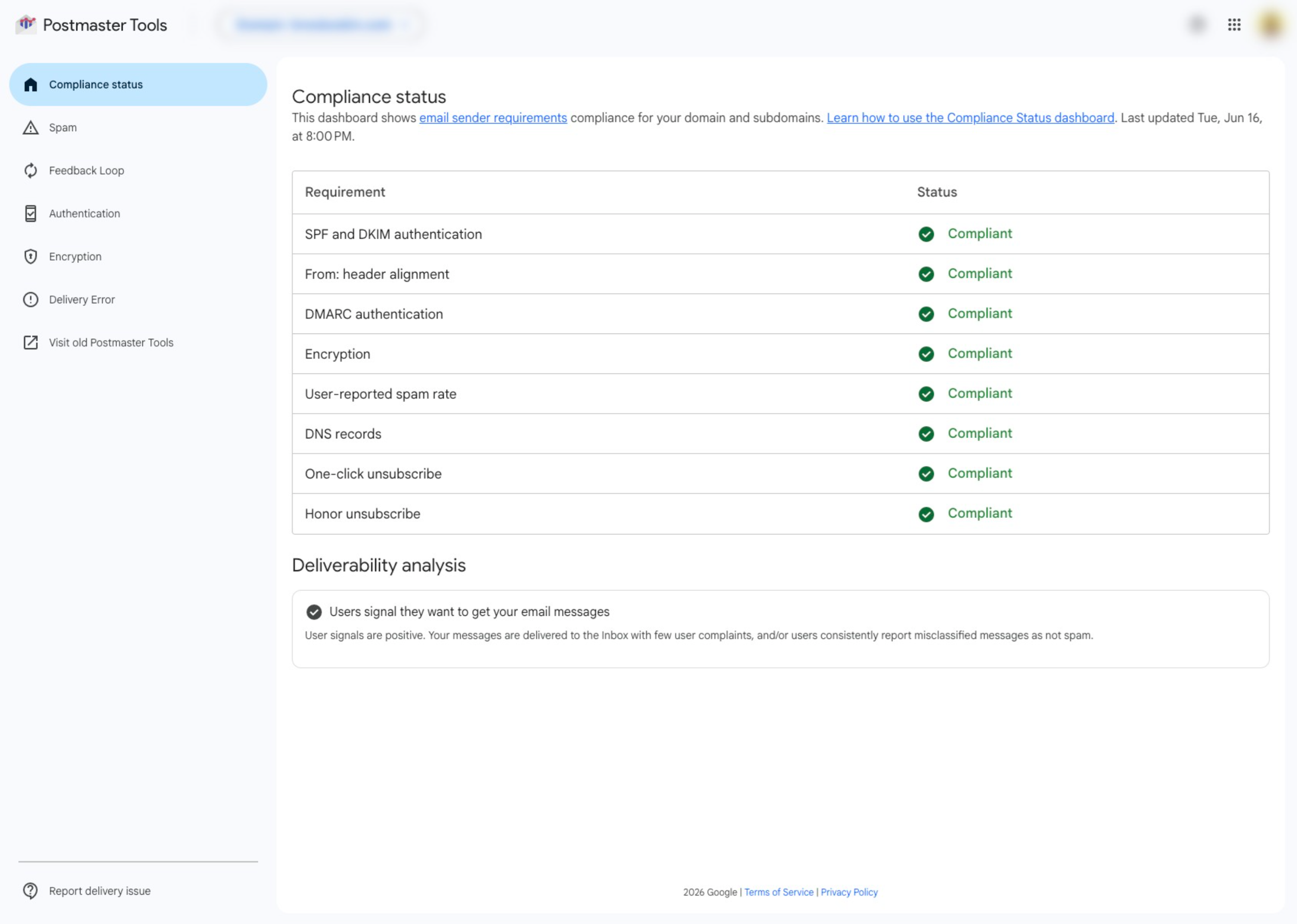
The Postmaster Tools home screen, once your sending domain is verified.
Getting in (and why it might be blank)
Setup is quick. You add your sending domain in Postmaster Tools, drop one record into your DNS to verify you own it, and you're in. If your SPF and DKIM aren't set up yet, sort that out first, or the tool will just show you failures. (If you're on Klaviyo with a dedicated sending domain, this is already in place.)
One thing that throws people: the dashboards can come up empty. Google needs enough Gmail volume before it shows you anything, and it hides data on low-volume days to protect privacy. The compliance view in particular needs real volume (Google's figure is around 5,000 Gmail messages in a single day), so a smaller brand might see a spam rate and not much else. There's also a day or two of lag, so don't check the same afternoon you send. Blank days are normal, not broken.
What changed in 2025 (so you're not hunting for the wrong thing)
If you poked around Postmaster Tools a while back, you might remember a Domain Reputation score rated High, Medium, Low, or Bad. Go looking for it now and you won't find it. Google started retiring the old version at the end of September 2025 and removed the reputation scores.
It points you at a few clearer things instead. Here's what to read now.
Spam rate
This is the percentage of your delivered Gmail messages that people marked as spam by hand. It's the most honest signal in the whole tool, because it's your actual customers telling Google they didn't want your email. Google's guidance is to keep it under 0.1%, and it treats 0.3% as the line where things start breaking. Cross that and Gmail starts routing more of your mail to spam. If you see a spike, line it up against your send calendar. It almost always traces back to one Klaviyo campaign or one audience you shouldn't have mailed.
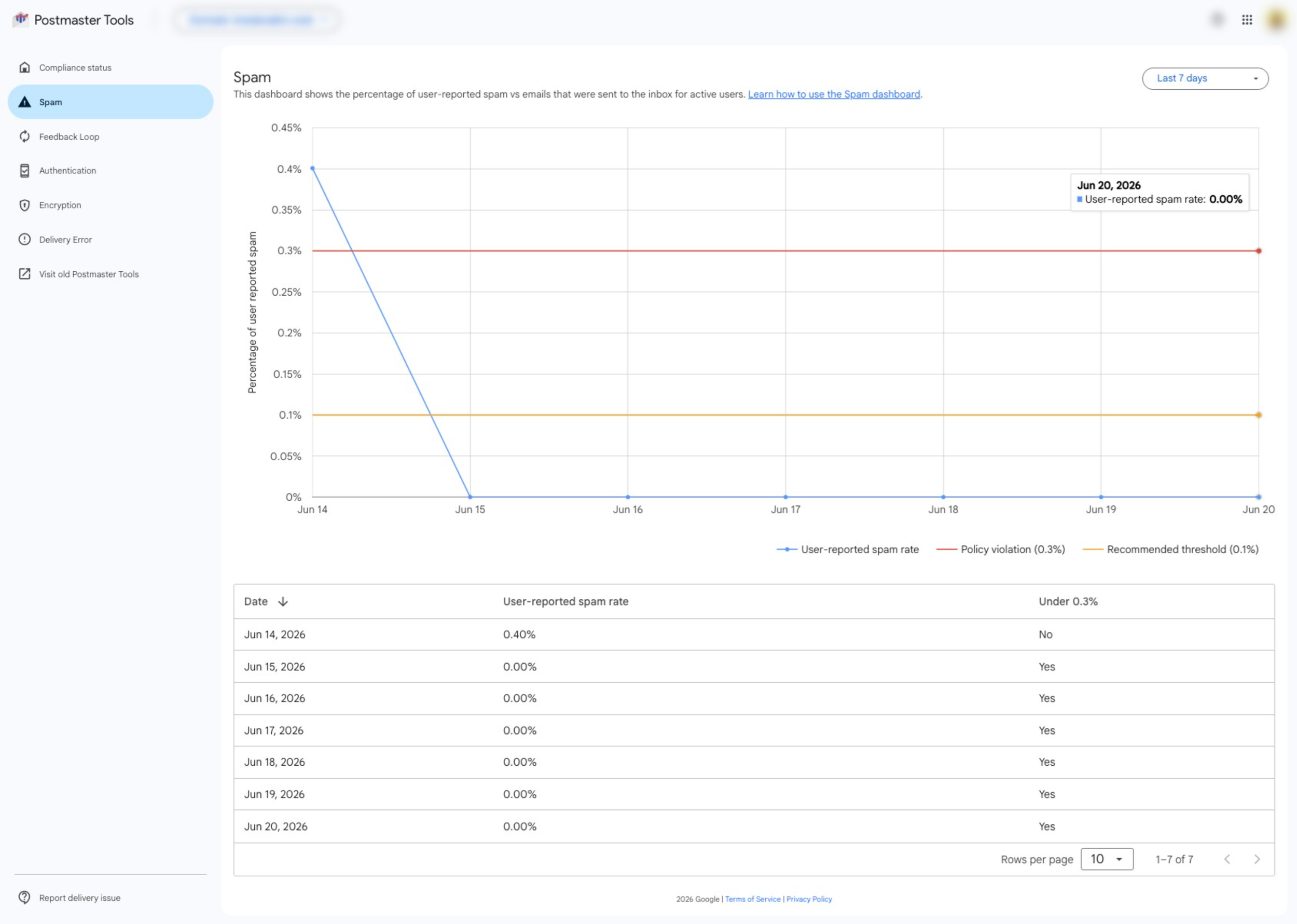
The spam rate graph, with Google's 0.10% recommended line and 0.30% ceiling.
Compliance status
This is a plain pass-or-needs-work report card on Gmail's sender rules: are you authenticated (SPF, DKIM, DMARC), do you offer one-click unsubscribe, do you honor unsubscribes quickly. Since late 2025 Gmail has teeth here. A failing status doesn't just send you to spam. Gmail can reject the message outright, so it never arrives at all. Green is the only answer you want on this one.
The newest piece: Gmail will tell you if people actually want your email
This is the part worth paying attention to. In June 2026, Google added a Deliverability analysis read inside the compliance dashboard. Instead of another technical chart, it gives you a plain-language verdict on your sending, leaning positive, neutral, or negative, with a short note on what to do about it.
Here's what makes it different from everything else in the tool. It isn't grading your setup. It's grading whether your audience wants your mail. You can pass every authentication check, keep your records clean, do everything right on paper, and still land a negative verdict, because people aren't opening, aren't reading, aren't engaging. Gmail is watching that, and now it's saying so in words.
Which is the same thing I've been telling brands for years. Gmail rewards email people actually want. This is just Gmail finally putting it on the screen for you.

The new Deliverability analysis verdict. A plain-language read on whether your audience wants your email.
The catch nobody mentions
A clean Postmaster Tools does not mean you're in the inbox.
Say that one back to yourself, because it trips up a lot of people. The tool only sees Gmail. It only counts the spam people report by hand, not the mail Gmail quietly filtered before anyone saw it. And it won't tell you whether you landed in the main inbox or got buried in the Promotions tab.
So treat it as one gauge, not the whole dashboard. Pair it with Klaviyo's own Deliverability Hub (inside your account, under Analytics) and a real inbox-placement test when something looks off. Postmaster Tools tells you how Gmail feels about you. It doesn't tell you where every email landed.
When the numbers are ugly
Here's the good news. When your spam rate climbs, your compliance status flips to needs-work, or that new verdict comes back negative, the fixes are the same boring moves, and they all happen inside Klaviyo.
Stop mailing people who never open. A list full of quiet subscribers is what pushes the spam rate up and drags that engagement verdict down. Build an engaged segment and send to that.
Set up a sunset Klaviyo flow so dead weight retires itself instead of you cleaning by hand every quarter.
Fix your authentication if compliance status is failing. SPF, DKIM, DMARC. Usually a one-time setup with your developer or through Klaviyo's sending-domain settings.
Make unsubscribing easy and honor it fast. Fighting to keep someone who wants out just earns you a spam complaint.
None of that is glamorous. It works, because it's exactly the behavior Gmail is grading you on.
I broke down the bigger picture of why email lands in spam in Your Emails Are Sending. They're Just Not Landing., and the open-rate side of this in Why Your Email Open Rates Are Dropping.
The takeaway
You can't manage what you can't see. For years, the honest read on your Gmail standing has been sitting behind a free dashboard you never logged into. Now you know it's there, and you know what to read: spam rate under 0.1%, compliance status green, and a deliverability verdict that says people want what you send.
Open it this week. Even if the picture isn't pretty, knowing is the point. You can't fix a number you've never looked at.
If you open it and the numbers worry you, or it's blank and you can't tell why, let's talk it through. Book a free call and we'll look at what Gmail's actually seeing and whether your sending needs a real fix. No pressure, no pitch.
Email is a system, not a send.
— Alex